
Tabs3 Connect has a new look for Tabs3 Cloud users. It’s built around how you work every day, so the information you use most is easier to find and you need fewer clicks to get your work done. Here’s what’s new.
A Home Base: The New Dashboard
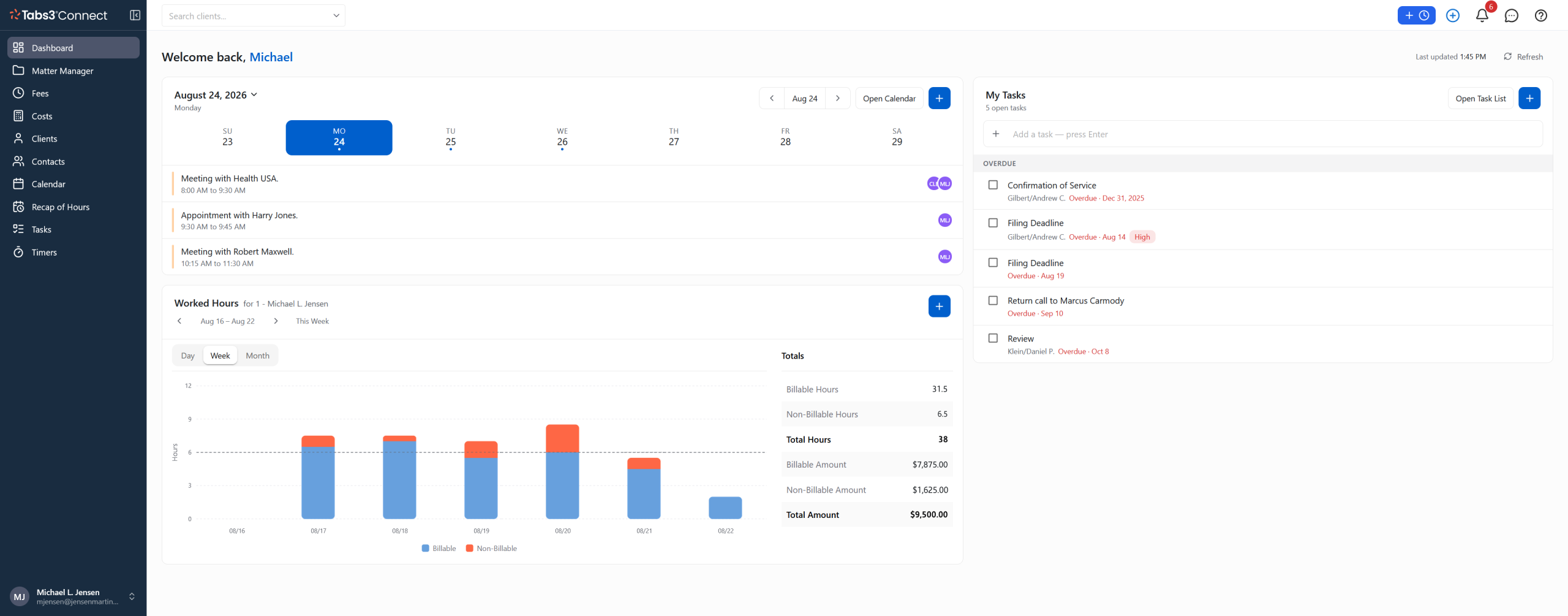
The Dashboard shows your day on one screen:
- Your week at a glance. See your week’s appointments. You can jump straight to the full calendar or add an event from here.
- My Tasks. Your open tasks appear here, and you can quickly add a new task by typing it and pressing Enter. Mark any task complete by checking it off your list.
- Worked Hours. See your billable and non-billable hours and amounts for the day, week, or month.
Easier Navigation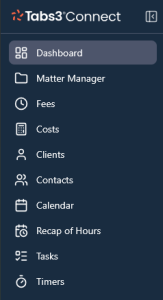
- Sidebar menu. All areas are always one click away on the left sidebar: Dashboard, Matter Manager, Fees, Costs, Clients, Contacts, Calendar, Recap of Hours, Tasks, and Timers. You can collapse the sidebar when you need more room.
- Client search from anywhere. The search box at the top of every page takes you straight to a client.
- Quick actions in the header. Start a new timer, add a new record, check alarms and eNotes, or open Help from any page.

More Control Over Your Lists
Lists now have additional features:
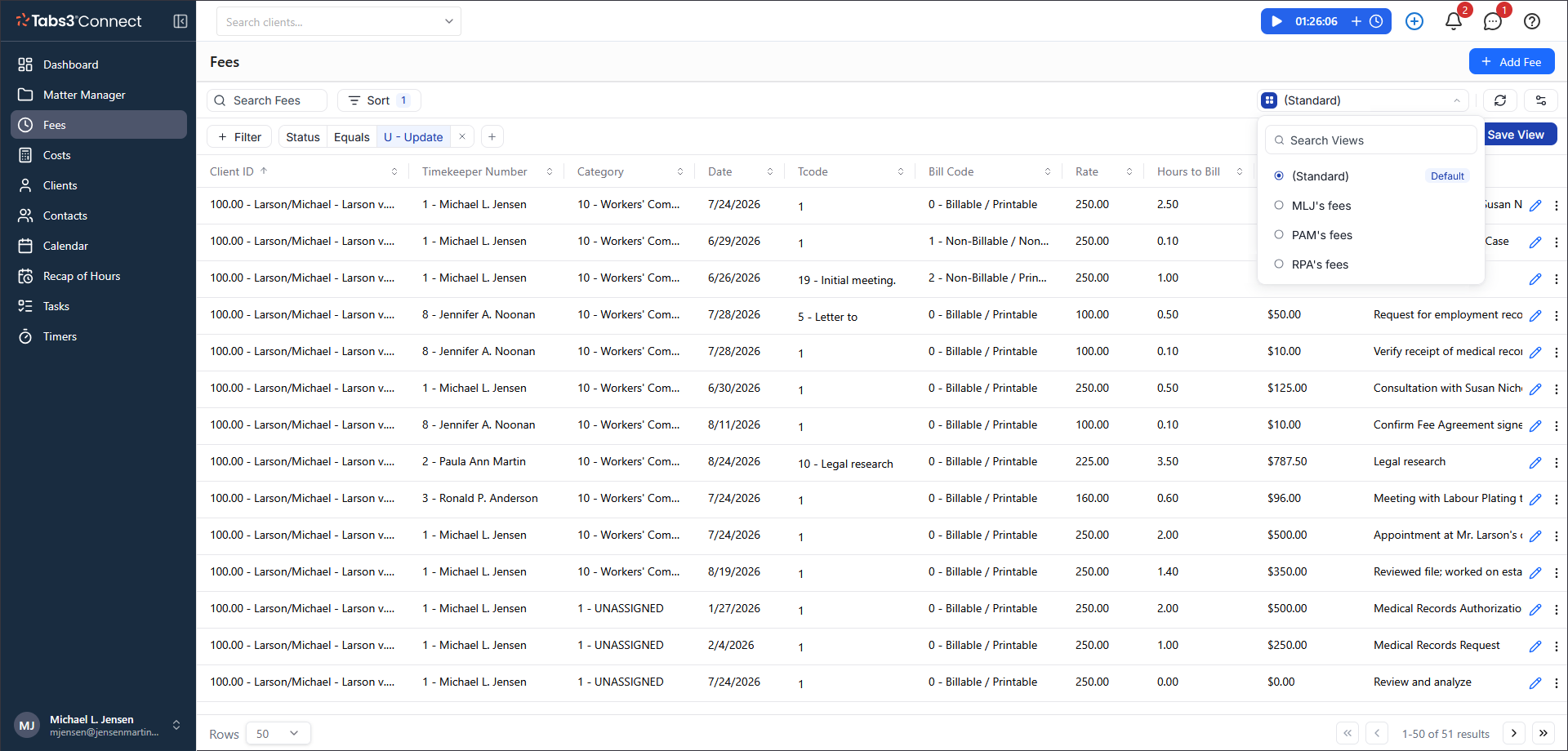
- Search, sort, and filter your records.
- Choose which columns to show and drag them into the order you want.
- Change the row height and column size, and wrap long descriptions.
- Save your setup as a view to use again later.
Matter Manager: Key Numbers Up Front
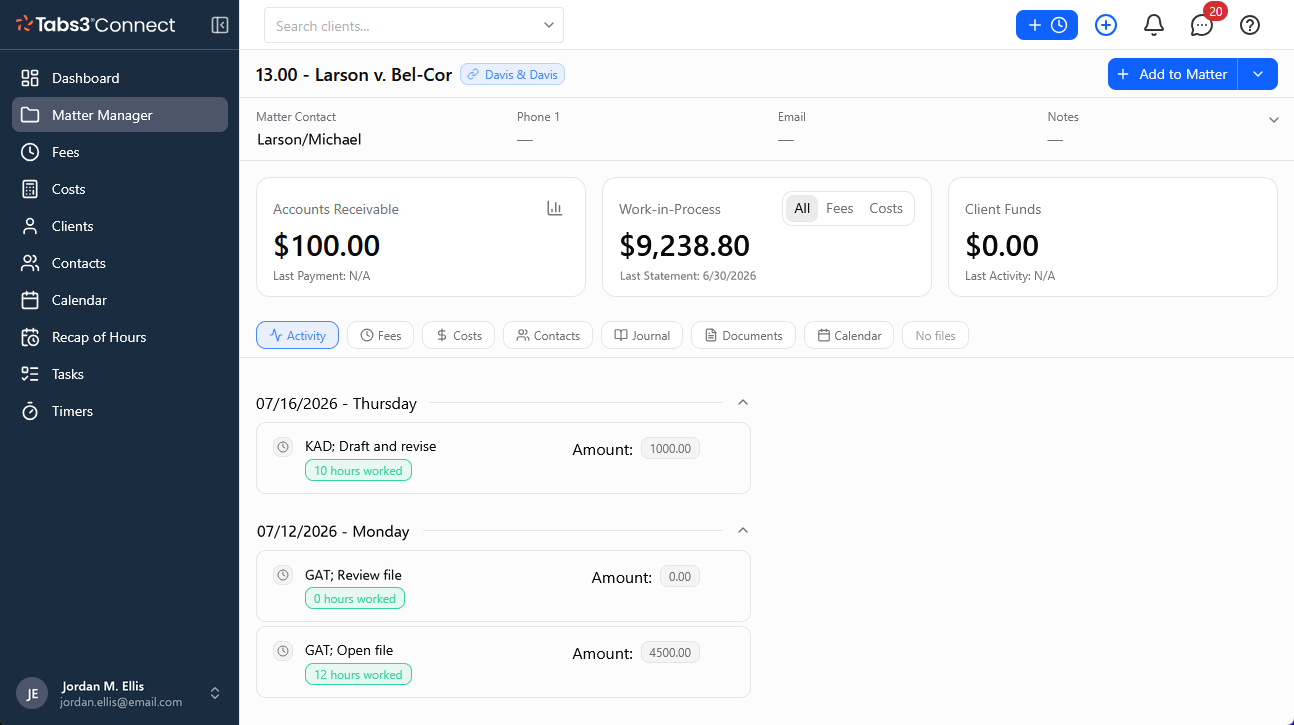
Every matter now opens with summary cards for Accounts Receivable (click to see a breakdown by aging period), Work-in-Process (you can switch between all, fees, or costs), and Client Funds. Below the cards you can quickly access Activity, Fees, Costs, Contacts, Journal, Documents, and Calendar for this matter. Common client related records, area of practice records, and any custom record groups are also accessible.
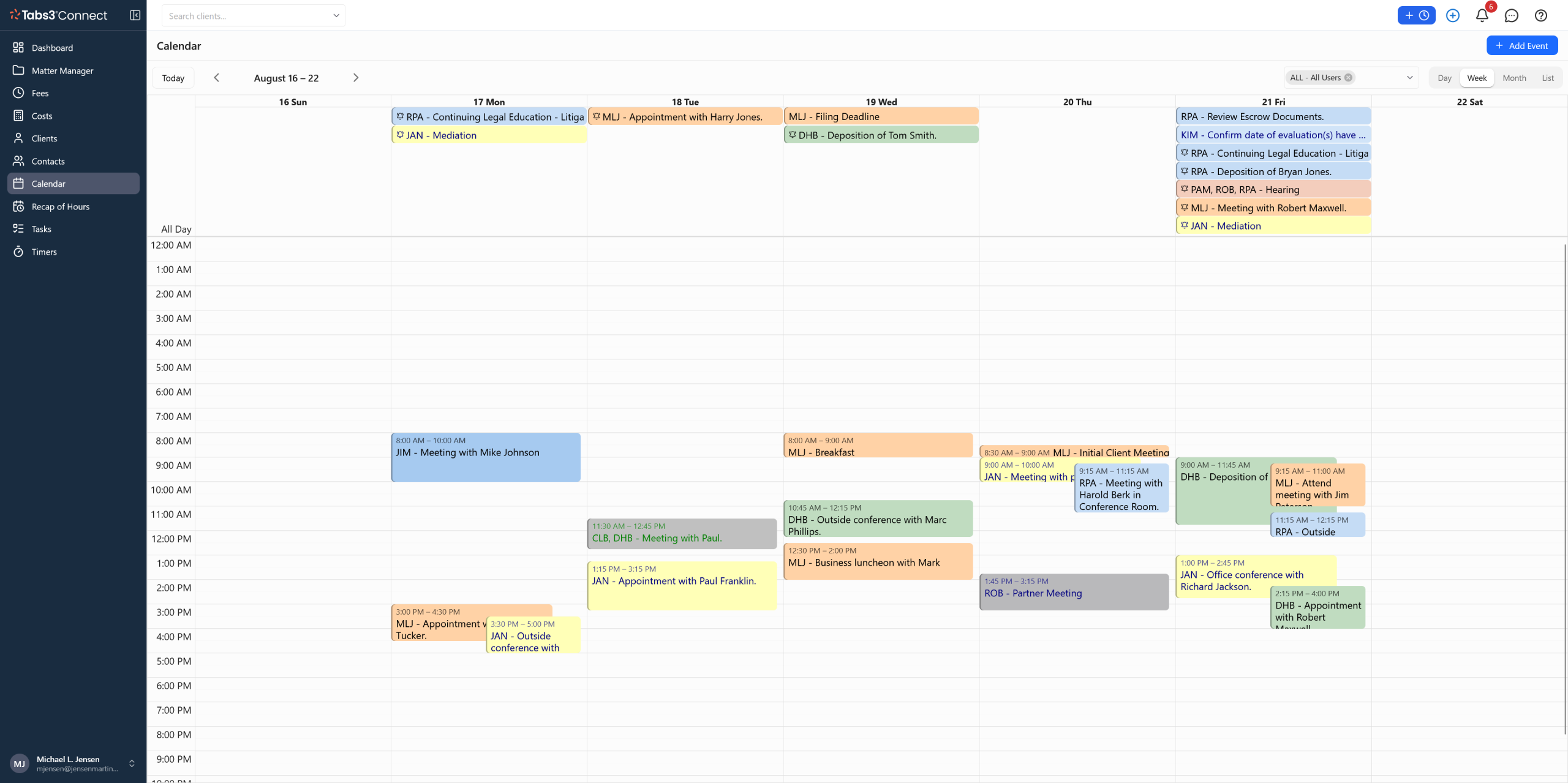
A More Visual Calendar
You can switch between the Day, Week, Month, and List views with one click. In Day and Week view, appointments appear on a time grid so you can quickly spot open time. Reminders and tasks can optionally appear in the All Day section at the top of the window.
Recap of Hours, Expanded
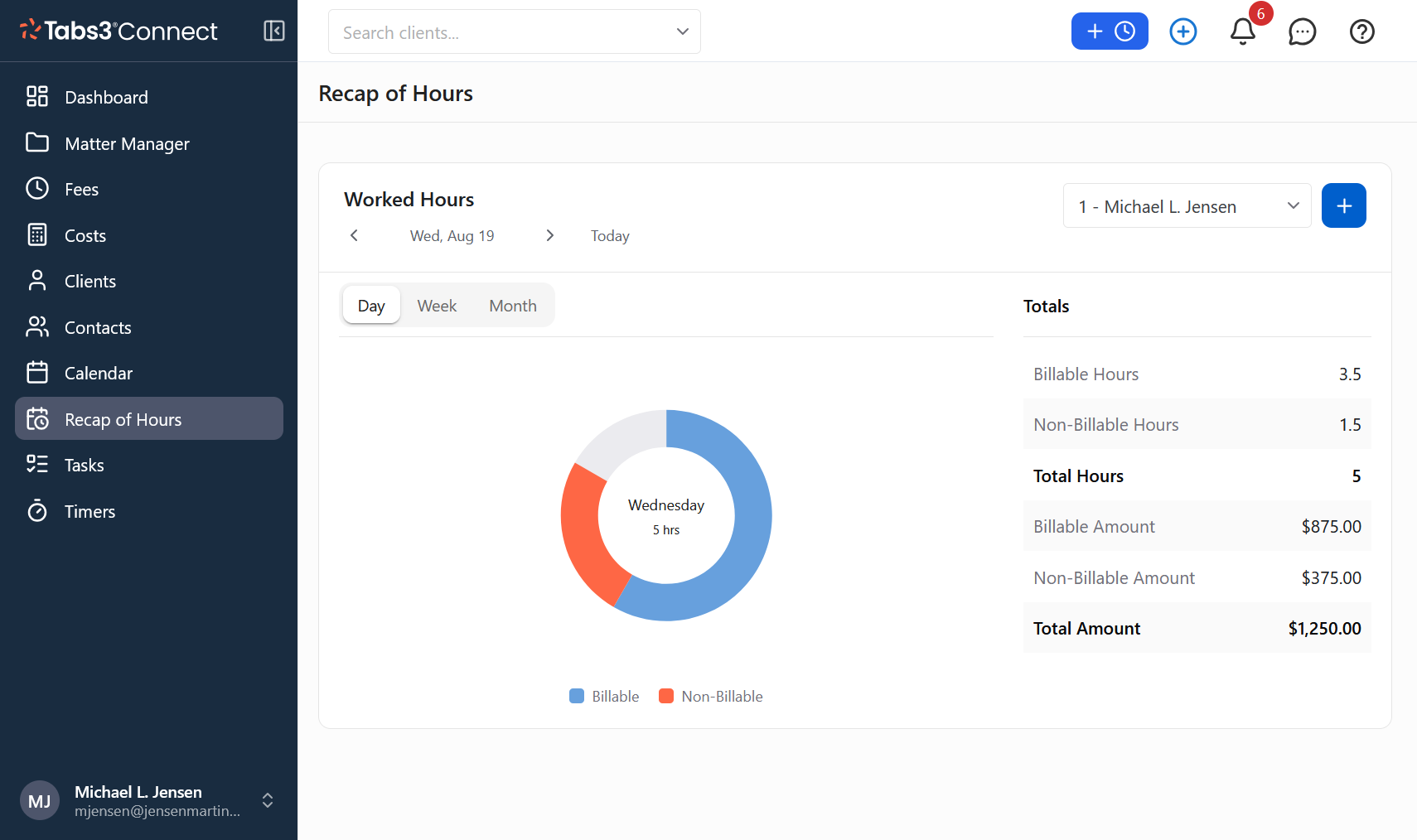
Recap of Hours shows a chart of your billable and non-billable time for the day, week, or month, with your totals beside it.
Dedicated pages for other features:
- eNotes show in the toolbar as they are received, and you can access a list of your eNotes from the reading popup.
- Alarms also show notifications in the toolbar for your upcoming events.
- Tasks has its own page, with built-in All, Incomplete, and Complete filters.
- Timers shows all your timers in one list, and you can restart any of them with the play button, edit or delete the timer, or convert it to a fee.

Our office will be closed on Thursday, November 26 and Friday November 27, in recognition of Thanksgiving.
Here are some helpful Support resources that are available 24/7:

Want to see all of the new features in Version 2026? Check out Knowledge Base Article R11990, “Introduction to New Features!”
This article provides information on each new feature. Features are listed by application and include screenshots and links to additional information when applicable. Each time we add a new feature to Version 2026, this article is updated so that you can get the information you need to begin using the feature.
Our Knowledge Base can be accessed at support.Tabs3.com. You can also access our Knowledge Base in the Quick Launch by searching for and selecting “Knowledge Base.”
Our office will be closed at 3:30 on Wednesday, December 10, for our annual Holiday Party.
Here are some helpful Support resources that are available 24/7:

Still keying in the same rent, lease, and depreciation entries every month? Set them up once as recurring entries in Tabs3 Accounts Payable Software and Tabs3 General Ledger Software, then post them all in one batch. If you set them up now, your January entries will be ready to go.
Where Recurring Entries Save You Time
- Accounts Payable: Set up rent, leases, parking, and mortgage payments once. Each month, they post as invoices in a single batch.
- General Ledger: Set up depreciation, amortization, notes payable, fixed investment income, and rent once. Each month, they post as journal entries in a single batch.
Set Up Once, Post Every Month
The steps are the same in AP and GL.
- In the Quick Launch, search for and select “Recurring Entry.”
- Press Ctrl+N, enter the entry details, and press Ctrl+S.
- Each month, search for and select “Post Recurring Entries” in the Quick Launch, and then click OK.
Pro Tips: Skip a Month Without Deleting Anything
- AP: Put a recurring entry on hold. It won’t post until you take it off hold.
- GL: When you post, clear the check box next to any entry you want to skip this month.
- AP: Look for AUTO in the Voucher field to quickly spot invoices that came from a recurring entry.
Learn More

Statement review comments are available to view after a statement has been updated, giving you a complete, lasting record of the notes added during the billing process. Statement review comments are now available in the Statement Manager and Matter Manager in Version 2026 (Build 26.2 and later).
Comments can be added and edited at any point during the pre-bill and final statement process. Once a statement has been updated, the comments are preserved and available to view, but are locked from further changes to protect the integrity of the finalized record.

Skip the hassle of collections this year by scheduling your matter’s one-time and recurring payments with Tabs3Pay!
The Scheduling Payments with Tabs3Pay video walks you through how to schedule a future-dated payment or series of payments, right from the Tabs3 Billing Matter Manager. This feature makes it easy to provide payment plans for your clients and allows you to get paid on a specific date, even when you’re not in the office.
Watch this three-minute video here:
Training Videos can be accessed at Tabs3.com/videos. You can also access the videos in the Quick Launch by searching for and selecting “Training Videos.”