Feature Article: Tabs3 Outlook Add-in
January 2026 Tags: Email, Outlook Integration, PracticeMaster
A new Add-in is available for Microsoft Outlook that allows users to journal emails to PracticeMaster Platinum from any instance of Outlook, including the web and New Outlook. The Add-in can be added to your Outlook account from the Microsoft Web Store, and will then be available in all versions of Outlook. To install the Add-in, Outlook must be connected to Microsoft Exchange Online or an Exchange server.
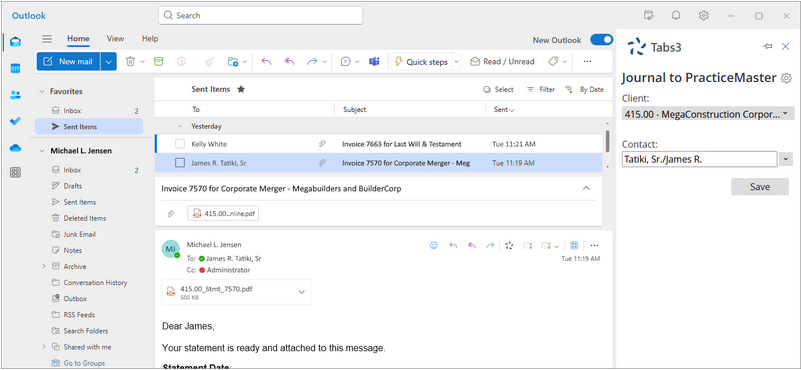
The Tabs3 Outlook Add-in requires users to log in with their Tabs3 Connect account. Once logged in, the Tabs3 pane in Outlook allows you to specify the Client and/or Contact and create a Journal record based on the email. Email that has been journaled will display the client and contact information.
For additional information, see KB Article R11985, “Configuring and Using the Tabs3 Outlook Add-in.” The Tabs3 Outlook Add-in is compatible with PracticeMaster Version 2025 (Build 25.2) and later.



